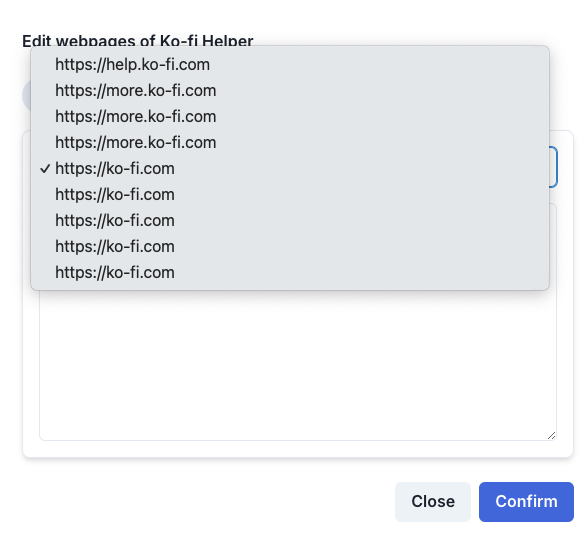
View Pages showing duplicate URLs
URLs in the ‘view pages’ pop-up are duplicated, but they cannot be clicked. If I click the second duplicate, it just takes me to the first and displays the same list of pages.
This may be because of testing with updating and adding pages to the database at different times
Comments2
Jasmine Lee
Oct 1, 2024
Hi @Jordan could you check within your list of crawled links for potential duplicate links with hash and have them removed from your link directory?
We believe it could be related to the same issue as mentioned before here: https://wonderchat.featurebase.app/p/read-more-docs-duplicated
Let us know if you need any more help!
jordan@ko-fi.com
Oct 4, 2024
Thanks Jasmine, I’ve just encountered this in another bot while trying to add a split knowledge base, which requires me to enter the URLs individually.
All my links have been added individually and are repeating in the dropdown, none of the links have # in them, it only seems to do this when you add individual URLs.
It understands they are from the same website, but still displays each item as if it’s from a unique website.